Rent collection
Know who has paid, today.
Invoices, receipts and arrears by age, in USD and ZiG, updated as money arrives.
What you get
- Bank statements matched to tenants
- Arrears by age at a glance
- USD and ZiG side by side
Inside the app
How rent collection works
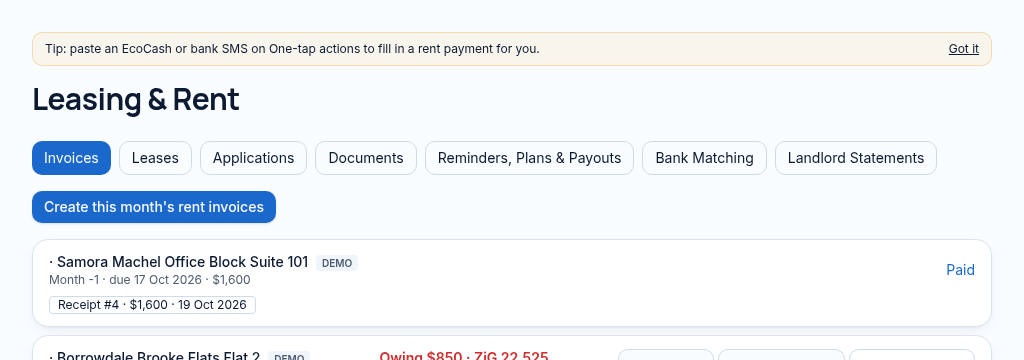
- Step 1
Review the lease invoices and due dates, with arrears calculated as invoice amount less confirmed payments.
- Step 2
Import a bank CSV or paste a supported payment SMS. Check the proposed match before saving a receipt.
- Step 3
Investigate unmatched lines and tenant-reported payments; staff confirmation is required before they become real receipts.
Connected, not duplicated
This workspace uses the linked properties, people and records your company can access. Available features depend on your plan, enabled modules and staff permissions. Features needing external services are marked Coming soon below.
The problem
Matching payments by hand takes days.
Matching rent payments to tenants by hand takes days and arrears grow unseen.
With PropertyFlow
- Bank statements matched to tenants
- Arrears by age at a glance
- USD and ZiG side by side
Inside Rent collection
Features in this module
- Rent invoicingMonthly rent invoices raised for every active lease.
- ReceiptsRecord a payment and issue a receipt.
- Arrears by ageWho owes what, for how long — 30, 60, 90 days.
- Bank statement matchingUpload a bank CSV and match payments to tenants.
- SMS smart-pastePaste a mobile money SMS and record the payment after you confirm.
- Working-day due datesDue dates on Zimbabwe public holidays move to the next working day.
Works hand in hand with
See Rent collection with your own records.
Book a walkthrough, or start a 14-day trial and set up your first property today.