Listings & marketing
Publish once. Show everywhere.
Write one listing, publish it to your own website and share it in a tap.
What you get
- Listings feed your own website
- AI drafts the description
- Share to WhatsApp in a tap
Inside the app
How listings & marketing works
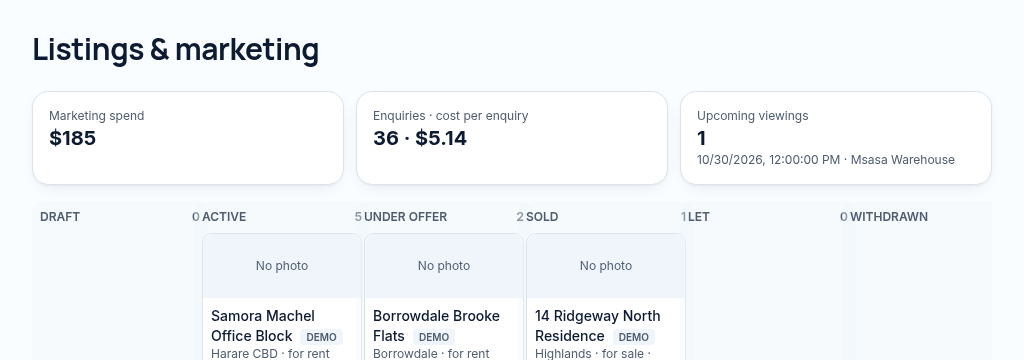
- Step 1
Choose a property and prepare its price, photos, features and marketing status.
- Step 2
Generate an AI description from the recorded details, review it and publish only approved public fields.
- Step 3
Share the listing link and record viewings, enquiries and marketing costs. External portal feeds still require provider access.
Connected, not duplicated
This workspace uses the linked properties, people and records your company can access. Available features depend on your plan, enabled modules and staff permissions. Features needing external services are marked Coming soon below.
The problem
Every listing is typed again for each site.
Re-typing the same listing on every site wastes hours and creates mistakes.
With PropertyFlow
- Listings feed your own website
- AI drafts the description
- Share to WhatsApp in a tap
Inside Listings & marketing
Features in this module
- Listing managerPrices, photos, features and status for every listing.
- AI listing descriptionsDraft a listing description from the property's details.
- Public property pagesYour listings on your website with safe, chosen details only.
- Listings mapBuyers browse your properties on a map.
- WhatsApp sharingShare a listing link to WhatsApp in one tap.
- Property portal feedsComing soonSend listings to Propertybook and Classifieds automatically.
Works hand in hand with
See Listings & marketing with your own records.
Book a walkthrough, or start a 14-day trial and set up your first property today.