Listings & marketing
AI listing descriptions
Draft a listing description from the property's details.
Ready to use today
How to use ai listing descriptions
Draft a listing description from the property's details. Use it within Listings & marketing alongside the linked property, contact and transaction records, rather than maintaining a separate disconnected list.
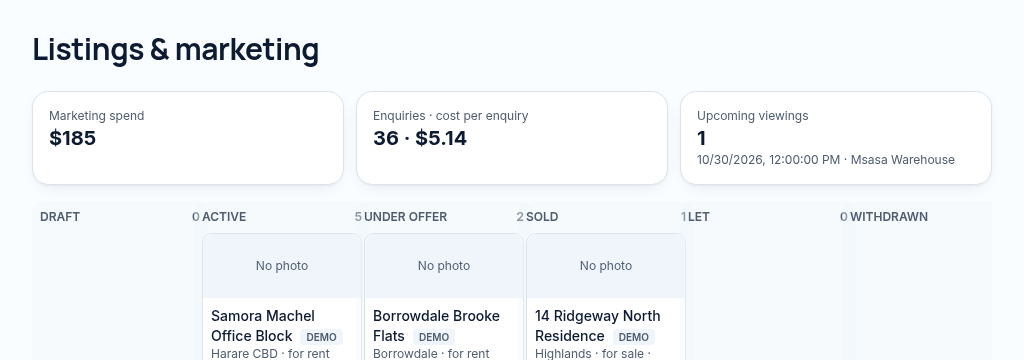
The connected workflow
- 1.Choose a property and prepare its price, photos, features and marketing status.
- 2.Generate an AI description from the recorded details, review it and publish only approved public fields.
- 3.Share the listing link and record viewings, enquiries and marketing costs. External portal feeds still require provider access.
Visibility follows your company, branch and section access. Important financial and approval actions remain subject to the app’s controls.
Why it matters
Re-typing the same listing on every site wastes hours and creates mistakes.
What changes
Write one listing, publish it to your own website and share it in a tap.
Found in
More in listings & marketing
- Listing managerPrices, photos, features and status for every listing.
- Public property pagesYour listings on your website with safe, chosen details only.
- Listings mapBuyers browse your properties on a map.
- WhatsApp sharingShare a listing link to WhatsApp in one tap.
- News & area guidesPublish articles and area guides on your website.
- Agent profilesPublic pages for your agents and their listings.
- Free valuation requestsA website form that lands as a lead for your team.
- Sitemap for search enginesYour listings and articles are listed for Google automatically.
- Property portal feedsSoonSend listings to Propertybook and Classifieds automatically.
See PropertyFlow with your own portfolio.
Book a walkthrough, or start a 14-day trial and set up your first property today.