Property management
Your whole portfolio, one tree.
One record per property and unit, linked to its owner, lease, repairs and money.

Inside the app
How property management works
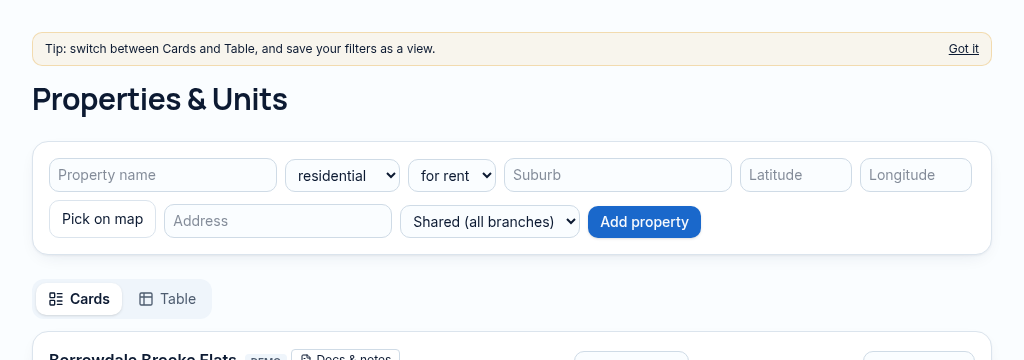
- Step 1
Add a property, its address, use and branch; choose its location on the map.
- Step 2
Add the units and their rents, then connect ownership and lease records. Each unit keeps its own occupancy position.
- Step 3
Review the property health, attachments and QR repair code before publishing chosen listing details.
Connected, not duplicated
This workspace uses the linked properties, people and records your company can access. Available features depend on your plan, enabled modules and staff permissions. Features needing external services are marked Coming soon below.
The problem
Nobody is sure which spreadsheet has the latest details.
Property details live in spreadsheets, phones and old files — nobody knows which version is right.
With PropertyFlow
- Properties, units and owners linked
- Health score for every property
- Photos and documents in one place
Inside Property management
Features in this module
- Property & unit registerProperties with units, sizes, features and status in one list.
- Owner & co-owner recordsWho owns what, with ownership shares for co-owned buildings.
- Property health scoreOne score from arrears, repairs, vacancy and lease expiry.
- Map location pickerDrop a pin on the map to set where a property is.
- Unit QR codesPrint a code per unit so tenants can report repairs.
- Custom fieldsAdd your own checked fields to properties and units.
Works hand in hand with
See Property management with your own records.
Book a walkthrough, or start a 14-day trial and set up your first property today.