Accounting
Books that balance — every time.
Real double-entry accounts where landlord rent is client money, never your income.
What you get
- Double-entry, balanced and reversible
- Closed months stay closed
- USD and ZiG with revaluations
Inside the app
How accounting works
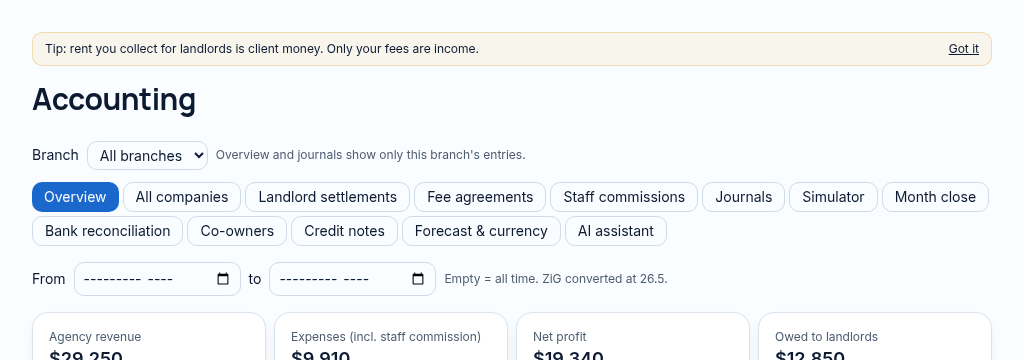
- Step 1
Review balanced journal entries, invoices, payments and account balances. Client journals cannot be deleted.
- Step 2
Approve supplier bills, review purchase orders and run controlled depreciation or currency adjustments.
- Step 3
Close the period through calculate, approve, pay and close; corrections use reversal or authorised reopening.
Connected, not duplicated
This workspace uses the linked properties, people and records your company can access. Available features depend on your plan, enabled modules and staff permissions. Features needing external services are marked Coming soon below.
The problem
Spreadsheets drift and nobody can prove the totals.
Agencies mix landlord rent with their own income and statements take days.
With PropertyFlow
- Double-entry, balanced and reversible
- Closed months stay closed
- USD and ZiG with revaluations
Inside Accounting
Features in this module
- Double-entry journalsEvery posting balanced, reversible, never deleted.
- Month-closeCalculate, approve, pay, close and reopen a month.
- USD & ZiGWork in both currencies, with exchange-rate adjustments.
- Supplier bills & purchase ordersApprove and pay bills with approval limits.
- Fixed assets & depreciationAsset register with monthly depreciation.
- Combined company accountsStatements across several companies in one currency.
Works hand in hand with
See Accounting with your own records.
Book a walkthrough, or start a 14-day trial and set up your first property today.