Developments & investments
Investor statements & portal
Investors see their own statements online.
Ready to use today
How to use investor statements & portal
Investors see their own statements online. Use it within Investments alongside the linked property, contact and transaction records, rather than maintaining a separate disconnected list.
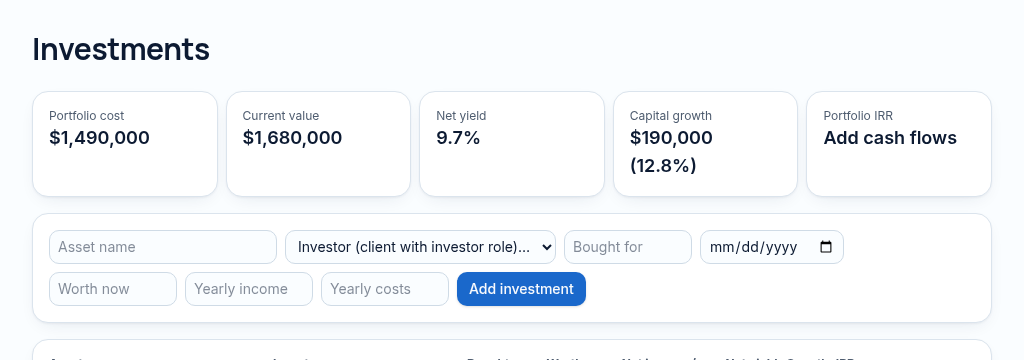
The connected workflow
- 1.Connect the investor and investment, then record dated cash contributed and returned.
- 2.Review valuation, yield and XIRR using the actual dates of the cashflows.
- 3.Prepare statements and enable the investor portal only for the matching authorised contact. Returns are not guarantees.
Visibility follows your company, branch and section access. Important financial and approval actions remain subject to the app’s controls.
Why it matters
Development budgets, tenders and investor money are spread across email and spreadsheets.
What changes
Milestones, tenders, off-plan sales and investor returns tracked together.
Found in
More in developments & investments
- Development projectsProjects with budgets, stages and dates.
- MilestonesTrack progress against each construction milestone.
- TendersCollect and compare contractor tenders.
- Off-plan salesSell units before completion and track deposits.
- Land pipelineLand under consideration, from idea to purchase.
- Feasibility calculatorCheck whether a project's numbers work before you start.
- Investment trackingInvestor money in, returns out.
- Investor returns (XIRR)True annual return from real cash dates.
- Construction site diarySoonDaily site notes and photos from the field.
See PropertyFlow with your own portfolio.
Book a walkthrough, or start a 14-day trial and set up your first property today.